History: Storyboard
Preview of version: 13
NOTES FROM AD: Need to figure out a scenario that illustrates how each of the assumptions in the Intro are lifted. Also, illustrate all the features LPH has implemented, or at least, the interesting ones. Haven't looked at the scenario below in detail, so I don't know if it meets that requirement. Also, we should narrate each step of the scenario using the Personaes above (or other personaes if they are better suited). After each screen shot, we should call the reader's attention to interesting UI elements that help the users carry out their tasks. Also, we should use the notation described in the Notations section to describe the state of the 3 pages at the bottom of each screen shot.
NOTE from AD: Make sure the storyboard includes a case of "cross-translation". See notes in the TODOs section for details on what this is about
NOTES FROM AD: Below, we have two storyboards. One based on what LPH had produced, and a new one that AD created. Neither of them is right. LPH's storyboard used the most recent version of CLWE, but there are some key screens missing if we want to tell the full story. AD's storyboard has pretty much all the screen shots we might want, but they used an old version of CLWE that didn't have the X% up to date messages. We should produce a brand new storyboard that would follow the story put together by AD, but using the latest version of CLWE.Maybe we could take keyframes from Rick Sapir's video?
In order to illustrate how CLWE supports unconstrained collaborative authoring and editing, we now describe a detailed usage storyboard. This storyboard involves three people (John Doe, Marie Quidam and Carlo del Pueblo) who are collaboratively writing the call for paper of a conference in 3 languages simultaneously (English, French and Spanish). For simplicity sake and better readability, we assume all three of them to be trilingual but that each of them are only changing the page in their native language. Also, we assume that they all the English user interface of the software. use the software with the EnglishNote however that this is not an assumption of CLWE. The system CAN be used by people who do not know all of the site's language, and they may translate and author in more than one language. Also, they may choose to operate the system with the user interface in any language of their choice.
John Doe starts out by writing basic information about the workshop on an English page. He does this in two consecutive edits.
SCREENSHOT: English page with parts of the text from the BabelWiki workshop Something like:
CALL FOR PARTICIPATION
Babel Wiki Workshop: Cross-Language Collaboration
Workshop Goal
The goal of this workshop is to explore how wikis and the wiki way might impact, and be influenced by, multilingual collaboration and language work. It aims to bring together people with an interest in multilingual collaboration, as well as specialists such as translators and terminologists, and authors who hope to find ways for their work to reach other language communities.
Translation State: en_v2 = {e1, e2}, fr = None, es = None
At this point, Marie Quidam decides to start translating in French, eventhough she can see that this is only a very prelimniary draft. She clicks on the Translate button, enters French as the target language and specifies the name of the page in French.
SNAPSHOT: Screen shot of dialog for specifying the language and title of a new translation. The language should be set to French, and the Title to the French title of the actual CFP for our workshop.
Translation State: en_v2 = {e1, e2}, fr = None, es = None
Marie then hits the Create Translation button.
SNAPSHOT: Screen shot initial translation dialog. The English content is pasted into the edit field and a Translation in Progress notice is inserted at the top. Red arrows call attention to this notice. Also, to the "Partial Translation" button. The first few sentences have been translated to French
Translation State: en_v2 = {e1, e2}, fr = None, es = None
Notice how the system automatically pasted the content of the English page into the edit box for this new French page, and that it also inserted a Translation in progress notice at the top. Marie starts translating the page, but the phone rings. To make sure she doesn't loose her work, she saves it as a Partial Translation.
SNAPSHOT: The French page as it appears after the "Partial Translation" save. The "translation in progress" notice appears in a yellow box, and there is a red arrow that calls reader's attention to it. There is a "translation" box that lists EN as a better translation, and that indicates FR as being only partially up to date. There are red arrows that call the reader's attention to these two things
Translation State: en_v2 = {e1, e2}, fr = None, es = None
At this point, a visitor coming to this page would see a very conspicuous "Translation in progress" notice and would know to treat it with caution. He would also see a note on the right? telling him that in contrast, the English page is up to date, so that he might go read the page there if he knows English. Notice how those simple features contribute to lifting the Enforceable timely translation assumption, by providing means to publish partially translated content without fear of misleading visitors.
Next, Marie comes back from her phone conversation and picks up translation where she left, by clicking on the updated icon (icon showing a document with right pointing arrow) beside the English page name. This time, Marie finishes the translation, erases the "Translation in progress" notice, and hits the Complete Translation button.
SCREENSHOT: FR page after complete translation. The page is listed as being 100% up to date, and we see En as an "equivalent" translation. Red arrows call reader's attention to those two things. The in progress notice has disappeared.
Translation State: en_v2 = {e1, e2}, fr = {e1, e2}, es = None
The French version is now deemed to incorporate the exact same edits as the English page, and this is reflected on the screen by the fact that the French page is now listed as being up to date, and that the English page is now listed ad being an equivalent translation.
At this point, Juan del Pueblo starts translating from the French page, but does not complete it. Notice how the Controlled language pairs assumption is lifted. Juan does not HAVE to translate from the more mainstream English language, and can use as a starting point, whichever language he feels most comfortable with.
SNAPSHOT: Spanish page with only the first few sentences translated
Translation State: en_v2 = {e1, e2}, fr = {e1, e2}, es = {}
At this point, Marie Quidam decides to add new information to the budding CFP, and she does it in French. Note how both the Master language and the Edit freeze assumptions have been lifted. Although the CFP originally started life as an English page, Marie is allowed to make original new contributions to it in any language. Also, eventhough the current revision of the French page is still being translated to Spanish, Marie is still allowed to modify the French page without having to wait for Spanish translation to be done.
SCREENSHOT: French page with new content added to it. Both English and Es are now listed as needing improvements, and red arrows call reader attention to that. The page is scrolled down to show the newly added text, which is:
Les thèmes qui pourront être abordés dans l'atelier comprennent, sans s'y limiter:
* Méthodes de traduction collaborative
* Projets de traduction collaborative
* Élaboration collaborative de ressources de traduction
* Wikis multilingues et traduction de contenu wiki
Translation State: en_v2 = {e1, e2}, fr = {e1, e2, e3}, es = {}
All of a sudden, John Doe hears that the deadline for paper submissions has been advanced by a month! He feels that this is information which needs to be conveyed right now and urgently. He goes to the English page and notices that it is severly out of date compared to the French (only X% up to date). But he is in a rush and does not have time to translate from French. So she edits the English page and adds information about the sumbission deadlines. When he saves the page she checks the send urgent translation request option (that checkbox is shown in earlier Fig X)
SCREENSHOT: English page as it appears after the deadline information has been added. English is still listed as being out of date, but French also is listed as needing improvement. Red arrows draw reader's attention to those two things. Page content is scrolled down to show the new text which says:
Submission deadline for Extended papers (short or full): May 3rd, 2008
Translation State: en_v2 = {e1, e2, e4*}, fr = {e1, e2, e3}, es = {}
At this point, both English and French include edits that the other page has not yet incorporated. In addition, edit e4 in the English page, has an urgent notice flag attached to it, as denoted by the asterisk beside it in our edit set notation. This state is reflected on the screen by the fact English is listed as being only X% up to date, and French is listed as needing improvement.
When Marie Quidam comes back to the French page, she sees that French needs updating, and that this is an "urgent" request, so she feels she should translate it right away.
SCREENSHOT: French page. Red arrow draw reader's attention to the "urgent translation" notice.
Translation State: en_v2 = {e1, e2, e4*}, fr = {e1, e2, e3}, es = {}
At this point the reader may feel that John, Marie and Juan have buried themselves into a waist deep mud pit, because none of the pages currently incorporates all the edits that need to be propagated in the different languages. In other words, there does not to be any stable point from which translation could easily and safely proceed from. No "pivot" version, no "solid stone" hidden in the mud.
Fortunately, they don't need one. Let's see how they can get out of this mess.
In order to illustrate how CLWE supports unconstrained collaborative authoring and editing, we now describe a detailed usage storyboard. This storyboard involves three people (JohnDoe, MarieQuidam and CarloDelPueblo) collaboratively writing a technical report for a project in 3 languages at once (English, French and Spanish). For simplicity sake, we assume all three of them to be trilingual but that each of them are only changing the page in their native language. But note that the system does not require that to be the case.
First, John Doe creates an English page in two consecutive edits.
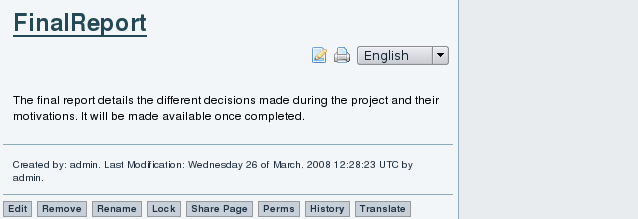
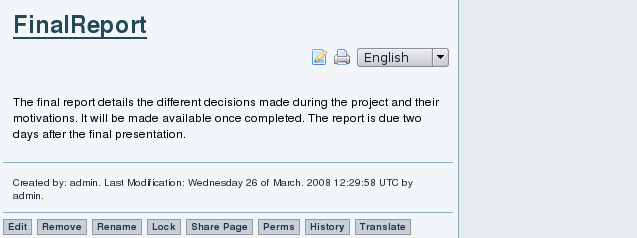
At this point, we have:
en_v2 = {e1, e2}
fr = None
es = None
At this point, Marie Quidam and Juan del Pueblo translate the English page to French and Spanish respectively. NOTE from AD: It's too bad that we don't have screen shot of what the translation UI looks like, the Under translation notices etc...
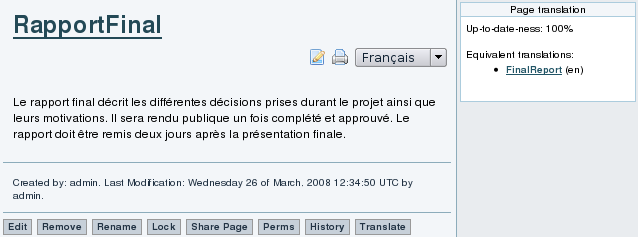
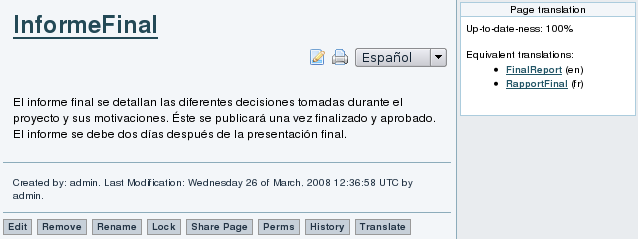
At this point, we have:
en_v2 = {e1, e2}
fr_v1 = {e1, e2}
es_v1 = {e1, e2}
And all pages are displayed as being up to date. At this point, Marie adds a list of bullet points to the French version. NOTE AD: Too bad we don't have a screen shot of Frenh with the bulet points. At this point, we have:
en_v2 = {e1, e2}
fr_v2 = {e1, e2, e3}
es_v1 = {e1, e2}
Both English and Spanish are displayed as being out of date ("22% up to date") like thus:
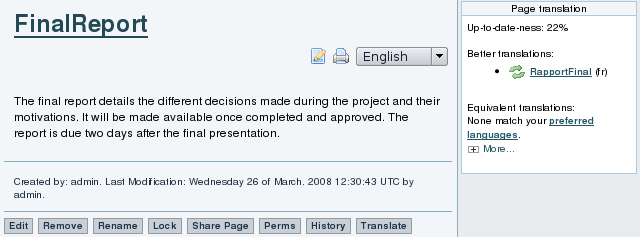
and they provide links to view the "better" French version, and update from it (the green double arrow icon).
At this point, John decides to update the English version from the French, by clicking on the double green arrow icon in front of the French page name.
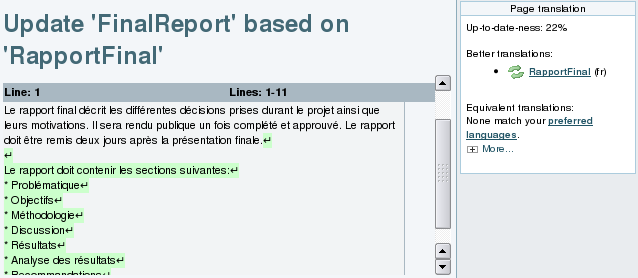
The system shows John the French changes that need to be reproduced in English (changes highlighted in green). John copies and pastes them to the Englsh edit field (not visible here... which is unfortunate), and starts overwriting them with their English translation. He then saves it.
At this point, we have:
en_v3 = {e1, e2, e3}
fr_v2 = {e1, e2, e3}
es_v1 = {e1, e2}
The English is now shown as being up to date, but the Spanish is still behind. But Juan who looks after the Spanish version is not in the mood for translating right now, and wants to add original content instead. No problem, he can do that. He adds the exact dates of the event along with the location {es_v2}. The page indicates that the page does contain additional content. However, more content can be obtained from the French and English versions. NOTE from AD: Hum... seems that the image for this transaction is wrong. I don't see dates added!
We now have:
en_v3 = {e1, e2, e3}
fr_v2 = {e1, e2, e3}
es_v1 = {e1, e2, e4}
and all three versions are considered to need updating. Now that Juan has gotten his original edits out of the way, he is in the mood for translating changes from English. After he is done, we have:
en_v3 = {e1, e2, e3}
fr_v2 = {e1, e2, e3}
es_v1 = {e1, e2, e3, e4}
which means that Spanish is completely up to date, but French and English need updating from Spanish.
Images below need to be threaded in the above discussion
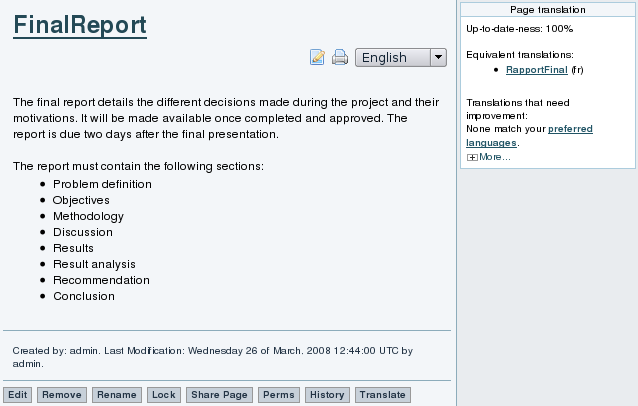
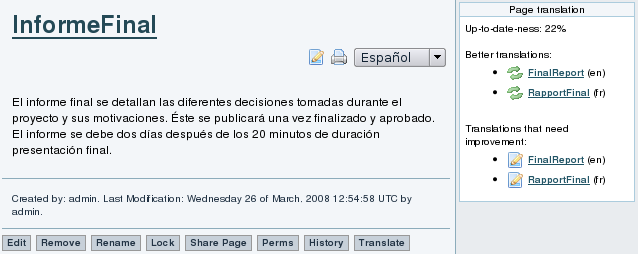
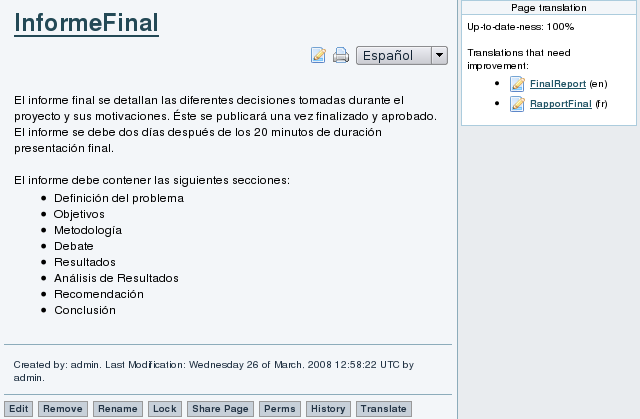
As it can be seen in the scenario, to a content contributor, the translation process is invisible. As any visitor of the website, the contributor will see the "Page Translation" box presenting the different alternatives and status information. However, he is free to ignore it. When a change is made by a content contributor, a new original content contribution is recorded and other linguistic versions of the page get updated with the information.
The "Page Translation" box provides links for translators to view the relevant changes made to the page. When using those links, the translator is brought to a slightly different version of the edit page. The page displays the changes to be translated along with the text area. When the translator indicates that the translation of the changes is completed, the translation target gets marked as containing the changes provided by the translation source. Again, other linguistic versions of the page get updated with the new information.
The directed graph representation of the described scenario can be illustrated as in figure {architecture_graph.dot.png}. In the graph, white nodes are original content contributions and gray nodes are versions resulting from a translation efforts. Solid arcs are page evolutions from version to version and dashed arcs are translations from source to target. On each node, the original content contributions included in the version are listed on the second row.
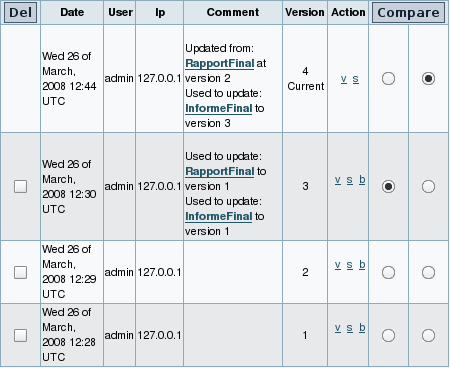
The graph representation is in fact very close to the internal representation used. Beyond providing useful information for the site visitors and support translators, the entire translation history is preserved. Figure {en_history} presents the page history of the English page in the scenario. The information from the translation history will allow to analyze the translation patterns and evolution of the communities around the different linguistic versions of a page.
First, John Doe creates English page Final Report in two consecutive edits. We now have:
en_v2 = {e1, e2}
fr = None
es = None
Then, Marie Quidam sees the English page, and hits the Traduire ("Translate") button. She enters French as the target language, and Rapport Final as the name of the target page. The system pastes the content of the English page Final Report into an edit box, and inserts a note "Under translation" at the top. Marie translates the first sentence, when the phone rings. She hits the Traduction Partielle ("Partial Translation") button and answers the phone. The status of the various pages is now:
en_v2 = {e1, e2}
fr_v1 = {}
es = None
The sytem shows the pages as not being up to date, because it says that the en version is "better". When Marie comes back from her phone conversatio, she clicks on the update icon in front of Final Report (en), translates the remaining two sentences, and this time hits the Complete Translation button, to signal that she is done translating. Note however that Marie forgets to delete the Under translation line at the top of the page.
We now have:
en_v2 = {e1, e2}
fr_v2 = {e1, e2}
es = None
and the French version Rapport Final is now displayed as being equivalent to the English Final Report. Later, Juan Del Pueblo sees the French page, hits the ??? ("Translate") button and translates the whole content in one go, making sure to save using the ??? ("Complete Translation") button. We now have:
en_v2 = {e1, e2}
fr_v2 = {e1, e2}
es_v1 = {e1, e2}
and the Spanish page Informe Final is listed as being equivalent to both the English and French versions. Now, Marie notices that she forgot to erase the Under translation line at the top of the French page. So she edits it, erases the page, and saves using the Modif. Mineure ("Minor Change") button. This means that the change is not considered as a change that needs translation. So the state of the three pages remains the same, and they are still displayed as being up to date with each other.
Next, John Doe adds three bullet points to the English version of the page. We now have:
en_v3 = {e1, e2, e3}
fr_v2 = {e1, e2}
es_v1 = {e1, e2}
At this point, the French and Spanish versions are labeled as needing updating from English. But Marie is not in a translation mood and would rather add original content to the French version. No problem, she can do that, and she adds her own two bullet points to the list. We now have:
en_v3 = {e1, e2, e3}
fr_v2 = {e1, e2, e4}
es_v1 = {e1, e2}
At this point, all three versions are labeled as missing some edits. Now that Marie has gotten her original edits out her mind, she is in the mood for translating, and decides to update from the English version (by clicking on the double green arrows in front of the English page name). The changes to be translated are highlighted in green at the top of the screen. Marie copies and pastes it into the French edit field, then translates it to French and saves as a complete translation. We now have:
en_v3 = {e1, e2, e3}
fr_v3 = {e1, e2, e3, e4}
es_v1 = {e1, e2}
The French version is the most up to date, but English and Spanish still needs to be updated. Now, Juan wants to bring Spanish up to date. He can do this either by updating from English or French.
What next... Maybe Marie can now incorporate John's changes, and later on, Juan can decide which of EN or FR to update from... Q: Does the tool help him make that decision?
NOTES FROM AD: Storyboard below is being replaced by new storyboard above
First, John Doe creates a page in English, in two consecutive edits.
TO BE INSERTED HERE: Screen shot of the EN page
en_v2 = {e1, e2}
es = None
fr = None
Then, Juan Del Pueblo decides to translate it to Spanish.
TO BE INSERTED HERE: Screen shot of the dialog where he enters the language and name of target page
TO BE INSERTED HERE: Screen shot of the initial translation dialog, with the En content pasted into the ES page, with the note at the top saying it's under translation
Note how the system automatically pasted the English content into the Spanish page, and inserted a noted at the top saying that it is under translation. Juan translatest the whole text in one go, and therefore erases the "Translation in Progress" notice. He saves the translation using the "Complete Translation" button.
TO BE INSERTED HERE: Screen shot of EN page, with 100% up to date notice, and a link to the EN
We now have:
en_v2 = {e1, e2}
es_v1 = {e1, e2}
fr = None
In other words, English and Spanish both contain the same edits, and there are no other linguistic versions that contain additional edits. This is reflected on the screen by the fact that the Spanish page lists the English page as an "equivalent translation", and it says that the Spanish version is "100% up to date".
Next, Marie Quidam sees the English page, and decides to translate it to French. She pushes on the "Translate" button, enters French as the language, and the name of the French page. But just as she is about to overwwrite the English content with its French translation, the phone rings. So she presses on the "Partial Translation" button.
TO BE INSERTED HERE: Screen shot of FR page, with Spanish content in it and still the English content
We now have:
en_v2 = {e1, e2}
es_v1 = {e1, e2}
fr_v1 = {}
Note how the French version is still assumed to not contain any of the edits from the English, because Marie saved the page as a "Partial Translation" and the system has no way of knowing which of e1 and e2, if any, has been translated at this point. This is reflected on the screen since the French page lists both English and Spanish as being "better" translations. It also says that the French version is 66% up to date (note: we will explain later how this number is callculated and why in this case, it's not 0%).
At this point, John Doe decides to add more content to the English page. This time though, the edit he does needs to be translated to all the other languages ASAP. So John checks the "Send urgent translation request" box before saving his edit.
TO BE INSERTED HERE: Screen shot of FEN page being edited and about to be saved, with the "Send urgent translation request" check box selected
We now have:
en_v2 = {e1, e2, e3*}
es_v1 = {e1, e2}
fr_v1 = {}
where the asterisk beside e3 denotes that this edit needs to be urgently translated. At this point, Juan looks at the Spanish page and sees the urgent translation notice at the top, and decides to do something about it. He clicks on the double green arrows icon in front of the English page name. The system shows him the content of the urgent edit e3* at the top, along with an edit box at the bottom with the Spanish content. Juan copies and pastes the English e3* content into the Spanish page, and overwrites it with its Spanish translation. He saves it as a complete translation.
TO BE INSERTED HERE: Screen shot of ES page without the Urgent translation request anymore
We now have:
en_v2 = {e1, e2, e3*}
es_v1 = {e1, e2, e3*}
fr_v1 = {}
In other words, Spanish is completely up to date, including the urgent edit, and this is reflected on the screen by the disappearance of the urgent translation notice.
Later still, Marie comes back from her phone conversation and decides to pickup the translation from English to French.
TO BE INSERTED HERE: Screen shot of French being translated from EN. The whole EN content is highligted (NOTE: IN RICK'S SNAPSHOT, ONLY PART OF THE EN CONTENT IS SELECTED. LPH THINKS IT'S BECAUSE RS MOCKED AROUND WITH PAGES IN WEIRD WAYS, TRANSLATING PAGES THAT ALREADY EXISTED, ETC... INITIALISATION OF HIS SITE WAS A BIT WEIRD IN OTHER WORDS. NORMALLY, THIS SHOULD NOT HAPPEN)
Since Marie previously saved her translation as "partial", the system does not know which of e1 or e2 has been propagated to French. Therefore it highlights both of them (which in this case turns out to be the whole English content). Marie does more of the translation but still saves it as saves is as a "Complete" translation.
NOTE from AD: Make sure the storyboard includes a case of "cross-translation". See notes in the TODOs section for details on what this is about
NOTES FROM AD: Below, we have two storyboards. One based on what LPH had produced, and a new one that AD created. Neither of them is right. LPH's storyboard used the most recent version of CLWE, but there are some key screens missing if we want to tell the full story. AD's storyboard has pretty much all the screen shots we might want, but they used an old version of CLWE that didn't have the X% up to date messages. We should produce a brand new storyboard that would follow the story put together by AD, but using the latest version of CLWE.Maybe we could take keyframes from Rick Sapir's video?
Newest and improved scenario by AD (2008-04-10@15h23)
In order to illustrate how CLWE supports unconstrained collaborative authoring and editing, we now describe a detailed usage storyboard. This storyboard involves three people (John Doe, Marie Quidam and Carlo del Pueblo) who are collaboratively writing the call for paper of a conference in 3 languages simultaneously (English, French and Spanish). For simplicity sake and better readability, we assume all three of them to be trilingual but that each of them are only changing the page in their native language. Also, we assume that they all the English user interface of the software. use the software with the EnglishNote however that this is not an assumption of CLWE. The system CAN be used by people who do not know all of the site's language, and they may translate and author in more than one language. Also, they may choose to operate the system with the user interface in any language of their choice.
John Doe starts out by writing basic information about the workshop on an English page. He does this in two consecutive edits.
SCREENSHOT: English page with parts of the text from the BabelWiki workshop Something like:
CALL FOR PARTICIPATION
Babel Wiki Workshop: Cross-Language Collaboration
Workshop Goal
The goal of this workshop is to explore how wikis and the wiki way might impact, and be influenced by, multilingual collaboration and language work. It aims to bring together people with an interest in multilingual collaboration, as well as specialists such as translators and terminologists, and authors who hope to find ways for their work to reach other language communities.
Translation State: en_v2 = {e1, e2}, fr = None, es = None
At this point, Marie Quidam decides to start translating in French, eventhough she can see that this is only a very prelimniary draft. She clicks on the Translate button, enters French as the target language and specifies the name of the page in French.
SNAPSHOT: Screen shot of dialog for specifying the language and title of a new translation. The language should be set to French, and the Title to the French title of the actual CFP for our workshop.
Translation State: en_v2 = {e1, e2}, fr = None, es = None
Marie then hits the Create Translation button.
SNAPSHOT: Screen shot initial translation dialog. The English content is pasted into the edit field and a Translation in Progress notice is inserted at the top. Red arrows call attention to this notice. Also, to the "Partial Translation" button. The first few sentences have been translated to French
Translation State: en_v2 = {e1, e2}, fr = None, es = None
Notice how the system automatically pasted the content of the English page into the edit box for this new French page, and that it also inserted a Translation in progress notice at the top. Marie starts translating the page, but the phone rings. To make sure she doesn't loose her work, she saves it as a Partial Translation.
SNAPSHOT: The French page as it appears after the "Partial Translation" save. The "translation in progress" notice appears in a yellow box, and there is a red arrow that calls reader's attention to it. There is a "translation" box that lists EN as a better translation, and that indicates FR as being only partially up to date. There are red arrows that call the reader's attention to these two things
Translation State: en_v2 = {e1, e2}, fr = None, es = None
At this point, a visitor coming to this page would see a very conspicuous "Translation in progress" notice and would know to treat it with caution. He would also see a note on the right? telling him that in contrast, the English page is up to date, so that he might go read the page there if he knows English. Notice how those simple features contribute to lifting the Enforceable timely translation assumption, by providing means to publish partially translated content without fear of misleading visitors.
Next, Marie comes back from her phone conversation and picks up translation where she left, by clicking on the updated icon (icon showing a document with right pointing arrow) beside the English page name. This time, Marie finishes the translation, erases the "Translation in progress" notice, and hits the Complete Translation button.
SCREENSHOT: FR page after complete translation. The page is listed as being 100% up to date, and we see En as an "equivalent" translation. Red arrows call reader's attention to those two things. The in progress notice has disappeared.
Translation State: en_v2 = {e1, e2}, fr = {e1, e2}, es = None
The French version is now deemed to incorporate the exact same edits as the English page, and this is reflected on the screen by the fact that the French page is now listed as being up to date, and that the English page is now listed ad being an equivalent translation.
At this point, Juan del Pueblo starts translating from the French page, but does not complete it. Notice how the Controlled language pairs assumption is lifted. Juan does not HAVE to translate from the more mainstream English language, and can use as a starting point, whichever language he feels most comfortable with.
SNAPSHOT: Spanish page with only the first few sentences translated
Translation State: en_v2 = {e1, e2}, fr = {e1, e2}, es = {}
At this point, Marie Quidam decides to add new information to the budding CFP, and she does it in French. Note how both the Master language and the Edit freeze assumptions have been lifted. Although the CFP originally started life as an English page, Marie is allowed to make original new contributions to it in any language. Also, eventhough the current revision of the French page is still being translated to Spanish, Marie is still allowed to modify the French page without having to wait for Spanish translation to be done.
SCREENSHOT: French page with new content added to it. Both English and Es are now listed as needing improvements, and red arrows call reader attention to that. The page is scrolled down to show the newly added text, which is:
Thèmes abordés
Les thèmes qui pourront être abordés dans l'atelier comprennent, sans s'y limiter:
* Méthodes de traduction collaborative
* Projets de traduction collaborative
* Élaboration collaborative de ressources de traduction
* Wikis multilingues et traduction de contenu wiki
Translation State: en_v2 = {e1, e2}, fr = {e1, e2, e3}, es = {}
All of a sudden, John Doe hears that the deadline for paper submissions has been advanced by a month! He feels that this is information which needs to be conveyed right now and urgently. He goes to the English page and notices that it is severly out of date compared to the French (only X% up to date). But he is in a rush and does not have time to translate from French. So she edits the English page and adds information about the sumbission deadlines. When he saves the page she checks the send urgent translation request option (that checkbox is shown in earlier Fig X)
SCREENSHOT: English page as it appears after the deadline information has been added. English is still listed as being out of date, but French also is listed as needing improvement. Red arrows draw reader's attention to those two things. Page content is scrolled down to show the new text which says:
Important dates
Submission deadline for Extended papers (short or full): May 3rd, 2008
Translation State: en_v2 = {e1, e2, e4*}, fr = {e1, e2, e3}, es = {}
At this point, both English and French include edits that the other page has not yet incorporated. In addition, edit e4 in the English page, has an urgent notice flag attached to it, as denoted by the asterisk beside it in our edit set notation. This state is reflected on the screen by the fact English is listed as being only X% up to date, and French is listed as needing improvement.
When Marie Quidam comes back to the French page, she sees that French needs updating, and that this is an "urgent" request, so she feels she should translate it right away.
SCREENSHOT: French page. Red arrow draw reader's attention to the "urgent translation" notice.
Translation State: en_v2 = {e1, e2, e4*}, fr = {e1, e2, e3}, es = {}
At this point the reader may feel that John, Marie and Juan have buried themselves into a waist deep mud pit, because none of the pages currently incorporates all the edits that need to be propagated in the different languages. In other words, there does not to be any stable point from which translation could easily and safely proceed from. No "pivot" version, no "solid stone" hidden in the mud.
Fortunately, they don't need one. Let's see how they can get out of this mess.
Old Scenario by LPH
The screenshots of this scenario are using the most recent version of CLWE. But there are some key screens missing if we want to tell the full story
In order to illustrate how CLWE supports unconstrained collaborative authoring and editing, we now describe a detailed usage storyboard. This storyboard involves three people (JohnDoe, MarieQuidam and CarloDelPueblo) collaboratively writing a technical report for a project in 3 languages at once (English, French and Spanish). For simplicity sake, we assume all three of them to be trilingual but that each of them are only changing the page in their native language. But note that the system does not require that to be the case.
First, John Doe creates an English page in two consecutive edits.
At this point, we have:
en_v2 = {e1, e2}
fr = None
es = None
At this point, Marie Quidam and Juan del Pueblo translate the English page to French and Spanish respectively. NOTE from AD: It's too bad that we don't have screen shot of what the translation UI looks like, the Under translation notices etc...
At this point, we have:
en_v2 = {e1, e2}
fr_v1 = {e1, e2}
es_v1 = {e1, e2}
And all pages are displayed as being up to date. At this point, Marie adds a list of bullet points to the French version. NOTE AD: Too bad we don't have a screen shot of Frenh with the bulet points. At this point, we have:
en_v2 = {e1, e2}
fr_v2 = {e1, e2, e3}
es_v1 = {e1, e2}
Both English and Spanish are displayed as being out of date ("22% up to date") like thus:
and they provide links to view the "better" French version, and update from it (the green double arrow icon).
At this point, John decides to update the English version from the French, by clicking on the double green arrow icon in front of the French page name.
The system shows John the French changes that need to be reproduced in English (changes highlighted in green). John copies and pastes them to the Englsh edit field (not visible here... which is unfortunate), and starts overwriting them with their English translation. He then saves it.
At this point, we have:
en_v3 = {e1, e2, e3}
fr_v2 = {e1, e2, e3}
es_v1 = {e1, e2}
The English is now shown as being up to date, but the Spanish is still behind. But Juan who looks after the Spanish version is not in the mood for translating right now, and wants to add original content instead. No problem, he can do that. He adds the exact dates of the event along with the location {es_v2}. The page indicates that the page does contain additional content. However, more content can be obtained from the French and English versions. NOTE from AD: Hum... seems that the image for this transaction is wrong. I don't see dates added!
We now have:
en_v3 = {e1, e2, e3}
fr_v2 = {e1, e2, e3}
es_v1 = {e1, e2, e4}
and all three versions are considered to need updating. Now that Juan has gotten his original edits out of the way, he is in the mood for translating changes from English. After he is done, we have:
en_v3 = {e1, e2, e3}
fr_v2 = {e1, e2, e3}
es_v1 = {e1, e2, e3, e4}
which means that Spanish is completely up to date, but French and English need updating from Spanish.
Images below need to be threaded in the above discussion
As it can be seen in the scenario, to a content contributor, the translation process is invisible. As any visitor of the website, the contributor will see the "Page Translation" box presenting the different alternatives and status information. However, he is free to ignore it. When a change is made by a content contributor, a new original content contribution is recorded and other linguistic versions of the page get updated with the information.
The "Page Translation" box provides links for translators to view the relevant changes made to the page. When using those links, the translator is brought to a slightly different version of the edit page. The page displays the changes to be translated along with the text area. When the translator indicates that the translation of the changes is completed, the translation target gets marked as containing the changes provided by the translation source. Again, other linguistic versions of the page get updated with the new information.
The directed graph representation of the described scenario can be illustrated as in figure {architecture_graph.dot.png}. In the graph, white nodes are original content contributions and gray nodes are versions resulting from a translation efforts. Solid arcs are page evolutions from version to version and dashed arcs are translations from source to target. On each node, the original content contributions included in the version are listed on the second row.
The graph representation is in fact very close to the internal representation used. Beyond providing useful information for the site visitors and support translators, the entire translation history is preserved. Figure {en_history} presents the page history of the English page in the scenario. The information from the translation history will allow to analyze the translation patterns and evolution of the communities around the different linguistic versions of a page.
en_history
New scenario created by AD
NOTE: I (AD) have BMP files for each step of the way on my laptop.
CRAP: I created it on wiki-translation site which doesn't have the most recent version! It lacks the X% up to date messages! I will try to construct a story using the screen shots that LPH produced instead.
First, John Doe creates English page Final Report in two consecutive edits. We now have:
en_v2 = {e1, e2}
fr = None
es = None
Then, Marie Quidam sees the English page, and hits the Traduire ("Translate") button. She enters French as the target language, and Rapport Final as the name of the target page. The system pastes the content of the English page Final Report into an edit box, and inserts a note "Under translation" at the top. Marie translates the first sentence, when the phone rings. She hits the Traduction Partielle ("Partial Translation") button and answers the phone. The status of the various pages is now:
en_v2 = {e1, e2}
fr_v1 = {}
es = None
The sytem shows the pages as not being up to date, because it says that the en version is "better". When Marie comes back from her phone conversatio, she clicks on the update icon in front of Final Report (en), translates the remaining two sentences, and this time hits the Complete Translation button, to signal that she is done translating. Note however that Marie forgets to delete the Under translation line at the top of the page.
We now have:
en_v2 = {e1, e2}
fr_v2 = {e1, e2}
es = None
and the French version Rapport Final is now displayed as being equivalent to the English Final Report. Later, Juan Del Pueblo sees the French page, hits the ??? ("Translate") button and translates the whole content in one go, making sure to save using the ??? ("Complete Translation") button. We now have:
en_v2 = {e1, e2}
fr_v2 = {e1, e2}
es_v1 = {e1, e2}
and the Spanish page Informe Final is listed as being equivalent to both the English and French versions. Now, Marie notices that she forgot to erase the Under translation line at the top of the French page. So she edits it, erases the page, and saves using the Modif. Mineure ("Minor Change") button. This means that the change is not considered as a change that needs translation. So the state of the three pages remains the same, and they are still displayed as being up to date with each other.
Next, John Doe adds three bullet points to the English version of the page. We now have:
en_v3 = {e1, e2, e3}
fr_v2 = {e1, e2}
es_v1 = {e1, e2}
At this point, the French and Spanish versions are labeled as needing updating from English. But Marie is not in a translation mood and would rather add original content to the French version. No problem, she can do that, and she adds her own two bullet points to the list. We now have:
en_v3 = {e1, e2, e3}
fr_v2 = {e1, e2, e4}
es_v1 = {e1, e2}
At this point, all three versions are labeled as missing some edits. Now that Marie has gotten her original edits out her mind, she is in the mood for translating, and decides to update from the English version (by clicking on the double green arrows in front of the English page name). The changes to be translated are highlighted in green at the top of the screen. Marie copies and pastes it into the French edit field, then translates it to French and saves as a complete translation. We now have:
en_v3 = {e1, e2, e3}
fr_v3 = {e1, e2, e3, e4}
es_v1 = {e1, e2}
The French version is the most up to date, but English and Spanish still needs to be updated. Now, Juan wants to bring Spanish up to date. He can do this either by updating from English or French.
What next... Maybe Marie can now incorporate John's changes, and later on, Juan can decide which of EN or FR to update from... Q: Does the tool help him make that decision?
NOTES FROM AD: Storyboard below is being replaced by new storyboard above
Other possible scenario based on keyframes from Rick Sapir's video
First, John Doe creates a page in English, in two consecutive edits.
TO BE INSERTED HERE: Screen shot of the EN page
en_v2 = {e1, e2}
es = None
fr = None
Then, Juan Del Pueblo decides to translate it to Spanish.
TO BE INSERTED HERE: Screen shot of the dialog where he enters the language and name of target page
TO BE INSERTED HERE: Screen shot of the initial translation dialog, with the En content pasted into the ES page, with the note at the top saying it's under translation
Note how the system automatically pasted the English content into the Spanish page, and inserted a noted at the top saying that it is under translation. Juan translatest the whole text in one go, and therefore erases the "Translation in Progress" notice. He saves the translation using the "Complete Translation" button.
TO BE INSERTED HERE: Screen shot of EN page, with 100% up to date notice, and a link to the EN
We now have:
en_v2 = {e1, e2}
es_v1 = {e1, e2}
fr = None
In other words, English and Spanish both contain the same edits, and there are no other linguistic versions that contain additional edits. This is reflected on the screen by the fact that the Spanish page lists the English page as an "equivalent translation", and it says that the Spanish version is "100% up to date".
Next, Marie Quidam sees the English page, and decides to translate it to French. She pushes on the "Translate" button, enters French as the language, and the name of the French page. But just as she is about to overwwrite the English content with its French translation, the phone rings. So she presses on the "Partial Translation" button.
TO BE INSERTED HERE: Screen shot of FR page, with Spanish content in it and still the English content
We now have:
en_v2 = {e1, e2}
es_v1 = {e1, e2}
fr_v1 = {}
Note how the French version is still assumed to not contain any of the edits from the English, because Marie saved the page as a "Partial Translation" and the system has no way of knowing which of e1 and e2, if any, has been translated at this point. This is reflected on the screen since the French page lists both English and Spanish as being "better" translations. It also says that the French version is 66% up to date (note: we will explain later how this number is callculated and why in this case, it's not 0%).
At this point, John Doe decides to add more content to the English page. This time though, the edit he does needs to be translated to all the other languages ASAP. So John checks the "Send urgent translation request" box before saving his edit.
TO BE INSERTED HERE: Screen shot of FEN page being edited and about to be saved, with the "Send urgent translation request" check box selected
We now have:
en_v2 = {e1, e2, e3*}
es_v1 = {e1, e2}
fr_v1 = {}
where the asterisk beside e3 denotes that this edit needs to be urgently translated. At this point, Juan looks at the Spanish page and sees the urgent translation notice at the top, and decides to do something about it. He clicks on the double green arrows icon in front of the English page name. The system shows him the content of the urgent edit e3* at the top, along with an edit box at the bottom with the Spanish content. Juan copies and pastes the English e3* content into the Spanish page, and overwrites it with its Spanish translation. He saves it as a complete translation.
TO BE INSERTED HERE: Screen shot of ES page without the Urgent translation request anymore
We now have:
en_v2 = {e1, e2, e3*}
es_v1 = {e1, e2, e3*}
fr_v1 = {}
In other words, Spanish is completely up to date, including the urgent edit, and this is reflected on the screen by the disappearance of the urgent translation notice.
Later still, Marie comes back from her phone conversation and decides to pickup the translation from English to French.
TO BE INSERTED HERE: Screen shot of French being translated from EN. The whole EN content is highligted (NOTE: IN RICK'S SNAPSHOT, ONLY PART OF THE EN CONTENT IS SELECTED. LPH THINKS IT'S BECAUSE RS MOCKED AROUND WITH PAGES IN WEIRD WAYS, TRANSLATING PAGES THAT ALREADY EXISTED, ETC... INITIALISATION OF HIS SITE WAS A BIT WEIRD IN OTHER WORDS. NORMALLY, THIS SHOULD NOT HAPPEN)
Since Marie previously saved her translation as "partial", the system does not know which of e1 or e2 has been propagated to French. Therefore it highlights both of them (which in this case turns out to be the whole English content). Marie does more of the translation but still saves it as saves is as a "Complete" translation.
History
SideMenu

Latest Changes
No records to display ...more
Search
Log In
Upcoming Events
No records to display