History: Storyboard
Preview of version: 4
NOTES FROM AD: Need to figure out a scenario that illustrates how each of the assumptions in the Intro are lifted. Also, illustrate all the features LPH has implemented, or at least, the interesting ones. Haven't looked at the scenario below in detail, so I don't know if it meets that requirement. Also, we should narrate each step of the scenario using the Personaes above (or other personaes if they are better suited). After each screen shot, we should call the reader's attention to interesting UI elements that help the users carry out their tasks. Also, we should use the notation described in the Notations section to describe the state of the 3 pages at the bottom of each screen shot.
NOTES FROM AD: Below, we have two storyboards. One based on what LPH had produced, and a new one that AD created. Neither of them is right. LPH's storyboard used the most recent version of CLWE, but there are some key screens missing if we want to tell the full story. AD's storyboard has pretty much all the screen shots we might want, but they used an old version of CLWE that didn't have the X% up to date messages. We should produce a brand new storyboard that would follow the story put together by AD, but using the latest version of CLWE.Maybe we could take keyframes from Rick Sapir's video?
In order to illustrate how CLWE supports unconstrained collaborative authoring and editing, we now describe a detailed usage storyboard. This storyboard involves three people (JohnDoe, MarieQuidam and CarloDelPueblo) collaboratively writing a technical report for a project in 3 languages at once (English, French and Spanish). For simplicity sake, we assume all three of them to be trilingual but that each of them are only changing the page in their native language. But note that the system does not require that to be the case.
First, John Doe creates an English page in two consecutive edits.
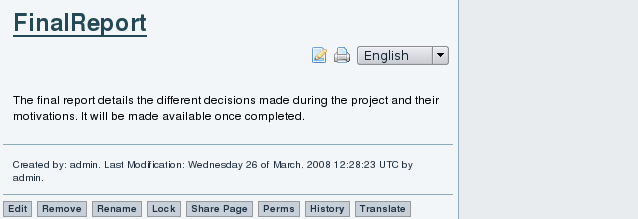
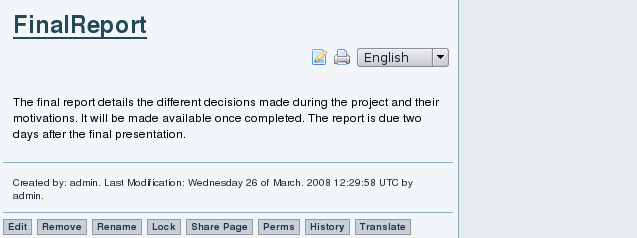
At this point, we have:
en_v2 = {e1, e2}
fr = None
es = None
At this point, Marie Quidam and Juan del Pueblo translate the English page to French and Spanish respectively. NOTE from AD: It's too bad that we don't have screen shot of what the translation UI looks like, the Under translation notices etc...
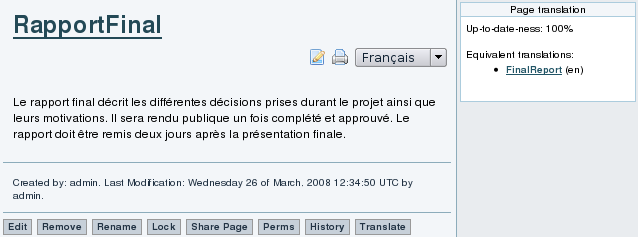
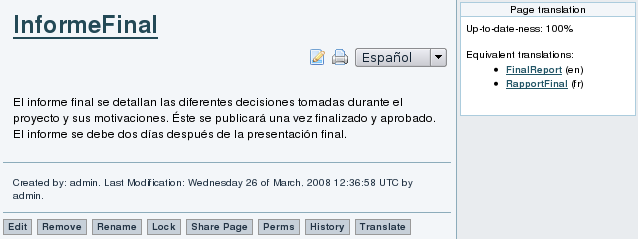
At this point, we have:
en_v2 = {e1, e2}
fr_v1 = {e1, e2}
es_v1 = {e1, e2}
And all pages are displayed as being up to date. At this point, Marie adds a list of bullet points to the French version. NOTE AD: Too bad we don't have a screen shot of Frenh with the bulet points. At this point, we have:
en_v2 = {e1, e2}
fr_v2 = {e1, e2, e3}
es_v1 = {e1, e2}
Both English and Spanish are displayed as being out of date ("22% up to date") like thus:
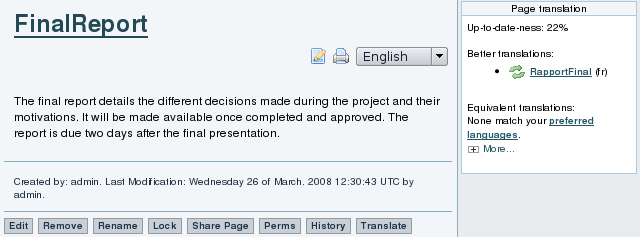
and they provide links to view the "better" French version, and update from it (the green double arrow icon).
At this point, John decides to update the English version from the French, by clicking on the double green arrow icon in front of the French page name.
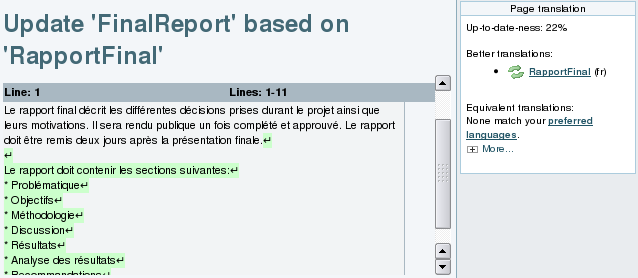
The system shows John the French changes that need to be reproduced in English (changes highlighted in green). John copies and pastes them to the Englsh edit field (not visible here... which is unfortunate), and starts overwriting them with their English translation. He then saves it.
At this point, we have:
en_v3 = {e1, e2, e3}
fr_v2 = {e1, e2, e3}
es_v1 = {e1, e2}
The English is now shown as being up to date, but the Spanish is still behind. But Juan who looks after the Spanish version is not in the mood for translating right now, and wants to add original content instead. No problem, he can do that. He adds the exact dates of the event along with the location {es_v2}. The page indicates that the page does contain additional content. However, more content can be obtained from the French and English versions. NOTE from AD: Hum... seems that the image for this transaction is wrong. I don't see dates added!
We now have:
en_v3 = {e1, e2, e3}
fr_v2 = {e1, e2, e3}
es_v1 = {e1, e2, e4}
and all three versions are considered to need updating. Now that Juan has gotten his original edits out of the way, he is in the mood for translating changes from English. After he is done, we have:
en_v3 = {e1, e2, e3}
fr_v2 = {e1, e2, e3}
es_v1 = {e1, e2, e3, e4}
which means that Spanish is completely up to date, but French and English need updating from Spanish.
Images below need to be threaded in the above discussion
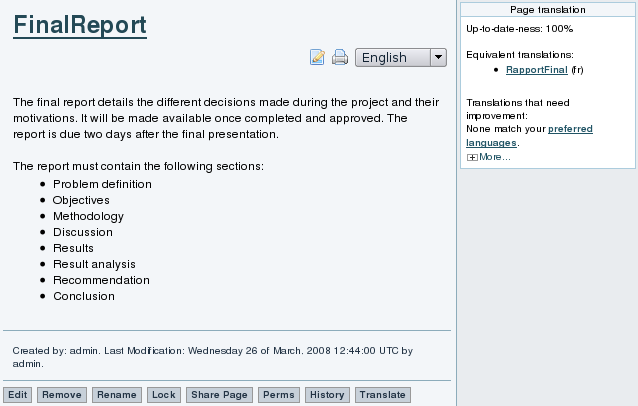
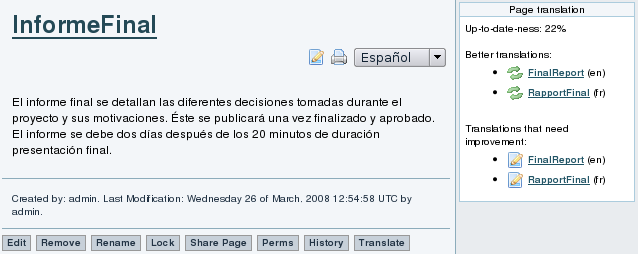
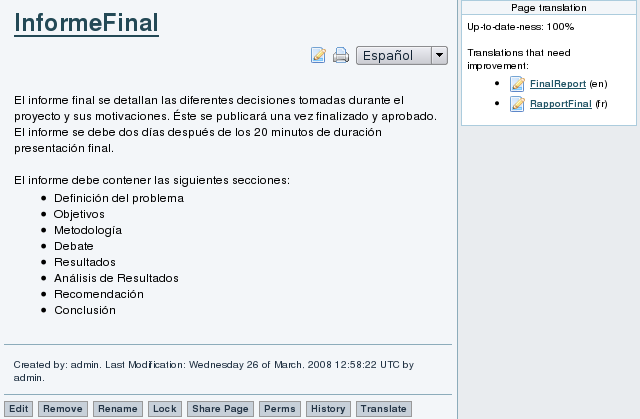
As it can be seen in the scenario, to a content contributor, the translation process is invisible. As any visitor of the website, the contributor will see the "Page Translation" box presenting the different alternatives and status information. However, he is free to ignore it. When a change is made by a content contributor, a new original content contribution is recorded and other linguistic versions of the page get updated with the information.
The "Page Translation" box provides links for translators to view the relevant changes made to the page. When using those links, the translator is brought to a slightly different version of the edit page. The page displays the changes to be translated along with the text area. When the translator indicates that the translation of the changes is completed, the translation target gets marked as containing the changes provided by the translation source. Again, other linguistic versions of the page get updated with the new information.
The directed graph representation of the described scenario can be illustrated as in figure {architecture_graph.dot.png}. In the graph, white nodes are original content contributions and gray nodes are versions resulting from a translation efforts. Solid arcs are page evolutions from version to version and dashed arcs are translations from source to target. On each node, the original content contributions included in the version are listed on the second row.
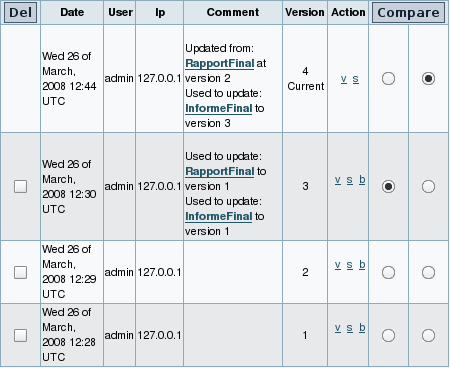
The graph representation is in fact very close to the internal representation used. Beyond providing useful information for the site visitors and support translators, the entire translation history is preserved. Figure {en_history} presents the page history of the English page in the scenario. The information from the translation history will allow to analyze the translation patterns and evolution of the communities around the different linguistic versions of a page.
First, John Doe creates English page Final Report in two consecutive edits. We now have:
en_v2 = {e1, e2}
fr = None
es = None
Then, Marie Quidam sees the English page, and hits the Traduire ("Translate") button. She enters French as the target language, and Rapport Final as the name of the target page. The system pastes the content of the English page Final Report into an edit box, and inserts a note "Under translation" at the top. Marie translates the first sentence, when the phone rings. She hits the Traduction Partielle ("Partial Translation") button and answers the phone. The status of the various pages is now:
en_v2 = {e1, e2}
fr_v1 = {}
es = None
The sytem shows the pages as not being up to date, because it says that the en version is "better". When Marie comes back from her phone conversatio, she clicks on the update icon in front of Final Report (en), translates the remaining two sentences, and this time hits the Complete Translation button, to signal that she is done translating. Note however that Marie forgets to delete the Under translation line at the top of the page.
We now have:
en_v2 = {e1, e2}
fr_v2 = {e1, e2}
es = None
and the French version Rapport Final is now displayed as being equivalent to the English Final Report. Later, Juan Del Pueblo sees the French page, hits the ??? ("Translate") button and translates the whole content in one go, making sure to save using the ??? ("Complete Translation") button. We now have:
en_v2 = {e1, e2}
fr_v2 = {e1, e2}
es_v1 = {e1, e2}
and the Spanish page Informe Final is listed as being equivalent to both the English and French versions. Now, Marie notices that she forgot to erase the Under translation line at the top of the French page. So she edits it, erases the page, and saves using the Modif. Mineure ("Minor Change") button. This means that the change is not considered as a change that needs translation. So the state of the three pages remains the same, and they are still displayed as being up to date with each other.
Next, John Doe adds three bullet points to the English version of the page. We now have:
en_v3 = {e1, e2, e3}
fr_v2 = {e1, e2}
es_v1 = {e1, e2}
At this point, the French and Spanish versions are labeled as needing updating from English. But Marie is not in a translation mood and would rather add original content to the French version. No problem, she can do that, and she adds her own two bullet points to the list. We now have:
en_v3 = {e1, e2, e3}
fr_v2 = {e1, e2, e4}
es_v1 = {e1, e2}
At this point, all three versions are labeled as missing some edits. Now that Marie has gotten her original edits out her mind, she is in the mood for translating, and decides to update from the English version (by clicking on the double green arrows in front of the English page name). The changes to be translated are highlighted in green at the top of the screen. Marie copies and pastes it into the French edit field, then translates it to French and saves as a complete translation. We now have:
en_v3 = {e1, e2, e3}
fr_v3 = {e1, e2, e3, e4}
es_v1 = {e1, e2}
The French version is the most up to date, but English and Spanish still needs to be updated. Now, Juan wants to bring Spanish up to date. He can do this either by updating from English or French.
What next... Maybe Marie can now incorporate John's changes, and later on, Juan can decide which of EN or FR to update from... Q: Does the tool help him make that decision?
NOTES FROM AD: Storyboard below is being replaced by new storyboard above
First, John Doe creates a page in English, in two consecutive edits.
TO BE INSERTED HERE: Screen shot of the EN page
en_v2 = {e1, e2}
fr = None
es = None
Then, Juan Del Pueblo decides to translate it to Spanish.
TO BE INSERTED HERE: Screen shot of the dialog where he enters the language and name of target page
TO BE INSERTED HERE: Screen shot of the initial translation dialog, with the En content pasted into the ES page, with the note at the top saying it's under translation
Note how the system automatically pasted the English content into the Spanish page, and inserted a noted at the top saying that it is under translation. Juan translatest the whole text in one go, and therefore erases the "Translation in Progress" notice. He saves the translation using the "Complete Translation" button.
NOTES FROM AD: Below, we have two storyboards. One based on what LPH had produced, and a new one that AD created. Neither of them is right. LPH's storyboard used the most recent version of CLWE, but there are some key screens missing if we want to tell the full story. AD's storyboard has pretty much all the screen shots we might want, but they used an old version of CLWE that didn't have the X% up to date messages. We should produce a brand new storyboard that would follow the story put together by AD, but using the latest version of CLWE.Maybe we could take keyframes from Rick Sapir's video?
Old Scenario by LPH
The screenshots of this scenario are using the most recent version of CLWE. But there are some key screens missing if we want to tell the full story
In order to illustrate how CLWE supports unconstrained collaborative authoring and editing, we now describe a detailed usage storyboard. This storyboard involves three people (JohnDoe, MarieQuidam and CarloDelPueblo) collaboratively writing a technical report for a project in 3 languages at once (English, French and Spanish). For simplicity sake, we assume all three of them to be trilingual but that each of them are only changing the page in their native language. But note that the system does not require that to be the case.
First, John Doe creates an English page in two consecutive edits.
At this point, we have:
en_v2 = {e1, e2}
fr = None
es = None
At this point, Marie Quidam and Juan del Pueblo translate the English page to French and Spanish respectively. NOTE from AD: It's too bad that we don't have screen shot of what the translation UI looks like, the Under translation notices etc...
At this point, we have:
en_v2 = {e1, e2}
fr_v1 = {e1, e2}
es_v1 = {e1, e2}
And all pages are displayed as being up to date. At this point, Marie adds a list of bullet points to the French version. NOTE AD: Too bad we don't have a screen shot of Frenh with the bulet points. At this point, we have:
en_v2 = {e1, e2}
fr_v2 = {e1, e2, e3}
es_v1 = {e1, e2}
Both English and Spanish are displayed as being out of date ("22% up to date") like thus:
and they provide links to view the "better" French version, and update from it (the green double arrow icon).
At this point, John decides to update the English version from the French, by clicking on the double green arrow icon in front of the French page name.
The system shows John the French changes that need to be reproduced in English (changes highlighted in green). John copies and pastes them to the Englsh edit field (not visible here... which is unfortunate), and starts overwriting them with their English translation. He then saves it.
At this point, we have:
en_v3 = {e1, e2, e3}
fr_v2 = {e1, e2, e3}
es_v1 = {e1, e2}
The English is now shown as being up to date, but the Spanish is still behind. But Juan who looks after the Spanish version is not in the mood for translating right now, and wants to add original content instead. No problem, he can do that. He adds the exact dates of the event along with the location {es_v2}. The page indicates that the page does contain additional content. However, more content can be obtained from the French and English versions. NOTE from AD: Hum... seems that the image for this transaction is wrong. I don't see dates added!
We now have:
en_v3 = {e1, e2, e3}
fr_v2 = {e1, e2, e3}
es_v1 = {e1, e2, e4}
and all three versions are considered to need updating. Now that Juan has gotten his original edits out of the way, he is in the mood for translating changes from English. After he is done, we have:
en_v3 = {e1, e2, e3}
fr_v2 = {e1, e2, e3}
es_v1 = {e1, e2, e3, e4}
which means that Spanish is completely up to date, but French and English need updating from Spanish.
Images below need to be threaded in the above discussion
As it can be seen in the scenario, to a content contributor, the translation process is invisible. As any visitor of the website, the contributor will see the "Page Translation" box presenting the different alternatives and status information. However, he is free to ignore it. When a change is made by a content contributor, a new original content contribution is recorded and other linguistic versions of the page get updated with the information.
The "Page Translation" box provides links for translators to view the relevant changes made to the page. When using those links, the translator is brought to a slightly different version of the edit page. The page displays the changes to be translated along with the text area. When the translator indicates that the translation of the changes is completed, the translation target gets marked as containing the changes provided by the translation source. Again, other linguistic versions of the page get updated with the new information.
The directed graph representation of the described scenario can be illustrated as in figure {architecture_graph.dot.png}. In the graph, white nodes are original content contributions and gray nodes are versions resulting from a translation efforts. Solid arcs are page evolutions from version to version and dashed arcs are translations from source to target. On each node, the original content contributions included in the version are listed on the second row.
The graph representation is in fact very close to the internal representation used. Beyond providing useful information for the site visitors and support translators, the entire translation history is preserved. Figure {en_history} presents the page history of the English page in the scenario. The information from the translation history will allow to analyze the translation patterns and evolution of the communities around the different linguistic versions of a page.
en_history
New scenario created by AD
NOTE: I (AD) have BMP files for each step of the way on my laptop.
CRAP: I created it on wiki-translation site which doesn't have the most recent version! It lacks the X% up to date messages! I will try to construct a story using the screen shots that LPH produced instead.
First, John Doe creates English page Final Report in two consecutive edits. We now have:
en_v2 = {e1, e2}
fr = None
es = None
Then, Marie Quidam sees the English page, and hits the Traduire ("Translate") button. She enters French as the target language, and Rapport Final as the name of the target page. The system pastes the content of the English page Final Report into an edit box, and inserts a note "Under translation" at the top. Marie translates the first sentence, when the phone rings. She hits the Traduction Partielle ("Partial Translation") button and answers the phone. The status of the various pages is now:
en_v2 = {e1, e2}
fr_v1 = {}
es = None
The sytem shows the pages as not being up to date, because it says that the en version is "better". When Marie comes back from her phone conversatio, she clicks on the update icon in front of Final Report (en), translates the remaining two sentences, and this time hits the Complete Translation button, to signal that she is done translating. Note however that Marie forgets to delete the Under translation line at the top of the page.
We now have:
en_v2 = {e1, e2}
fr_v2 = {e1, e2}
es = None
and the French version Rapport Final is now displayed as being equivalent to the English Final Report. Later, Juan Del Pueblo sees the French page, hits the ??? ("Translate") button and translates the whole content in one go, making sure to save using the ??? ("Complete Translation") button. We now have:
en_v2 = {e1, e2}
fr_v2 = {e1, e2}
es_v1 = {e1, e2}
and the Spanish page Informe Final is listed as being equivalent to both the English and French versions. Now, Marie notices that she forgot to erase the Under translation line at the top of the French page. So she edits it, erases the page, and saves using the Modif. Mineure ("Minor Change") button. This means that the change is not considered as a change that needs translation. So the state of the three pages remains the same, and they are still displayed as being up to date with each other.
Next, John Doe adds three bullet points to the English version of the page. We now have:
en_v3 = {e1, e2, e3}
fr_v2 = {e1, e2}
es_v1 = {e1, e2}
At this point, the French and Spanish versions are labeled as needing updating from English. But Marie is not in a translation mood and would rather add original content to the French version. No problem, she can do that, and she adds her own two bullet points to the list. We now have:
en_v3 = {e1, e2, e3}
fr_v2 = {e1, e2, e4}
es_v1 = {e1, e2}
At this point, all three versions are labeled as missing some edits. Now that Marie has gotten her original edits out her mind, she is in the mood for translating, and decides to update from the English version (by clicking on the double green arrows in front of the English page name). The changes to be translated are highlighted in green at the top of the screen. Marie copies and pastes it into the French edit field, then translates it to French and saves as a complete translation. We now have:
en_v3 = {e1, e2, e3}
fr_v3 = {e1, e2, e3, e4}
es_v1 = {e1, e2}
The French version is the most up to date, but English and Spanish still needs to be updated. Now, Juan wants to bring Spanish up to date. He can do this either by updating from English or French.
What next... Maybe Marie can now incorporate John's changes, and later on, Juan can decide which of EN or FR to update from... Q: Does the tool help him make that decision?
NOTES FROM AD: Storyboard below is being replaced by new storyboard above
Other possible scenario based on keyframes from Rick Sapir's video
First, John Doe creates a page in English, in two consecutive edits.
TO BE INSERTED HERE: Screen shot of the EN page
en_v2 = {e1, e2}
fr = None
es = None
Then, Juan Del Pueblo decides to translate it to Spanish.
TO BE INSERTED HERE: Screen shot of the dialog where he enters the language and name of target page
TO BE INSERTED HERE: Screen shot of the initial translation dialog, with the En content pasted into the ES page, with the note at the top saying it's under translation
Note how the system automatically pasted the English content into the Spanish page, and inserted a noted at the top saying that it is under translation. Juan translatest the whole text in one go, and therefore erases the "Translation in Progress" notice. He saves the translation using the "Complete Translation" button.
History
SideMenu

Latest Changes
No records to display ...more
Search
Log In
Upcoming Events
No records to display